Every dollar tracked. Nothing shared.
Your money.
Your device.
Your business.
Track spending, budgets, and net worth — without handing your bank login to anyone. No subscriptions. Your data stays local by default, with optional encrypted sync if you want it.
Get started in two steps.
Download your CSV
Under Statements or Download Activity in your bank, credit union, or credit card portal.
Drop it in
Transactions categorize automatically. Most land correctly on the first import.
Sync across devices (optional)
Sign in, then set a separate sync passphrase to encrypt everything before it syncs — more in Privacy below. Everything works without an account too.
What's inside.
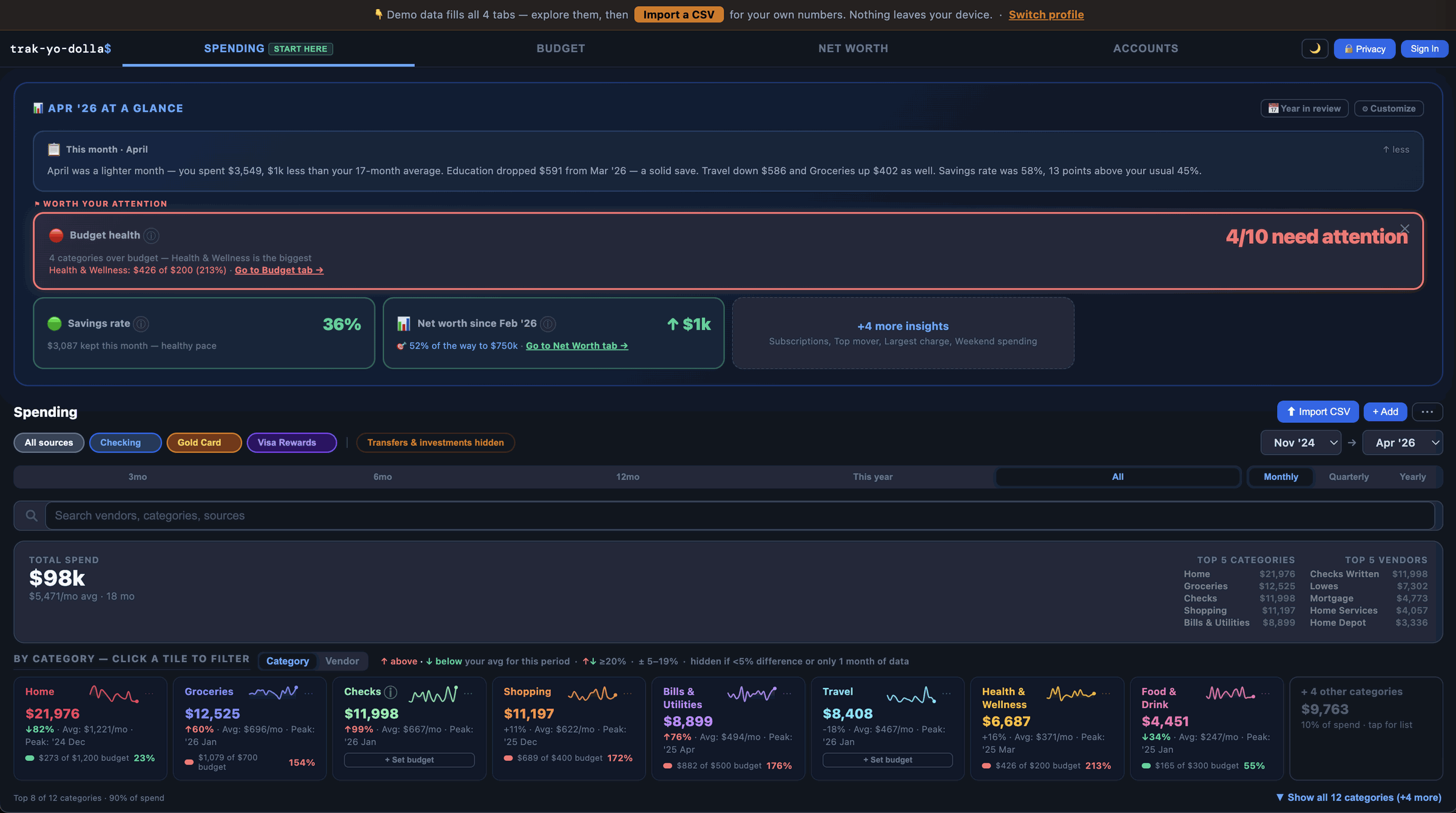
Several ways to see your spending
Click any category tile to filter transactions instantly across all views.
Your month in plain English
A short summary of what changed and why — lighter month, biggest mover, savings rate — written like a human, not a report.
Export your data anytime
Export transactions or budget history as a CSV, or export a full JSON backup — accounts, budgets, categories, and all transactions in one file. Import it back anytime to restore everything. Your data, portable, always.
Works offline. Installs as an app.
Install it on any device — add to your home screen on Android or iPhone, or install from the address bar in Chrome on your computer. It runs in its own window like a regular app, no address bar in the way. Works without internet too; your data lives on your device.
Full picture net worth
Checking, savings, investments, loans, real estate, and vehicles in one place. Save monthly snapshots and watch your trajectory toward a goal.
Smart auto-categorization — US, Canada, UK, Australia, New Zealand, and Singapore
Built for US, CA, UK, AU, NZ, and SG
The app supports banks and credit unions from all six countries by name. Auto-categorization covers local merchants — groceries, telecoms, transport, energy, food, and retail — in each market. Configure your currency symbol in settings: $ · C$ · £ · A$ · NZ$ · S$ · or any custom symbol.
Budgets that learn your patterns
Set monthly limits and see them alongside your 12-month average and year-to-date pace in one view. AT RISK warnings surface before you go over, and Unusual sort flags categories spiking compared to your own history.
Recurring charge detection
Surfaces subscriptions and regular charges automatically — including that trial you forgot to cancel.
Freelancer-friendly
Track income alongside spending, tag transactions as business or personal, and filter your whole view by either — all without a separate bookkeeping app.
The privacy-first way to track your money.
Keep your login to yourself
No bank logins, no screen scraping, no third-party data brokers. You import a CSV — the same file your bank or credit union already gives you.
Runs entirely in your browser
Everything saves locally. Refresh the page — it's still there. Close the tab — nobody else has it.
Works with your bank or credit union's CSV
Chase, Ally, Fidelity, Vanguard, NFCU, BECU, PenFed, TD, RBC, Scotiabank, BMO, CIBC, and most banks and credit unions. Drop the file in — the app auto-detects the format.
Migrating from Mint, YNAB, or Monarch Money? Drop in your export and your categories map across automatically.
Optional sync — never required
Sign in with Google or a passwordless email link, then set a sync passphrase — separate from your sign-in — to encrypt your data before it syncs. Forget that passphrase and your synced data is gone for good; nobody can recover it, not even me. Prefer to keep it local? Everything works without signing in.
Who built this?
One person — Nick Garofalo. I tracked my money in Python and Google Sheets for years. It worked, but I knew the analysis could go deeper — a clear picture of what spending looks like now, and what it might look like through the big changes: a move, a house, a car, a wedding, a kid. Every app that offered that wanted my bank login. So I built this instead. It's open source — read the code yourself ↗
Common questions.
Does it work with my bank?
If your bank lets you download transactions as a CSV — and nearly all of them do — you're good. Chase, Ally, Bank of America, Amex, USAA, TD, RBC, Barclays, Monzo, and most credit unions all work out of the box. Look for a Download or Export button in your transaction history.
Where is my data stored?
In your browser's local storage by default — on your device, not a server. Try it — close the tab, come back, it's all still there. Signing in adds optional encrypted sync (see Privacy above for how the passphrase works) and can be undone at any time. Full data flow →